Fellowship/Grant/Scholarship/Stipend Quick Links
- What are Fellowships, Grants, Scholarships and Stipends?
- How to Request Payment for Fellowships, Grants, Scholarships and Stipends | 1 page overview
- Policies and Resources
- FAQs
What are Fellowships, Grants, Scholarships and Stipends?
- Fellowships - A fellowship is an amount paid for the benefit of an individual to aid in the pursuit or study or research. Notable taxation items for consideration are available HERE.
- Grants
- Scholarships - A scholarship is an amount paid to or for the benefit of a student at an educational institution to aid in the pursuit of studies. Notable taxation items for consideration are available HERE.
- Stipends
How to determine what's the best way to pay a student or scholar? Review the Student/Scholar Payment Characterization Checklist (SPCC)/
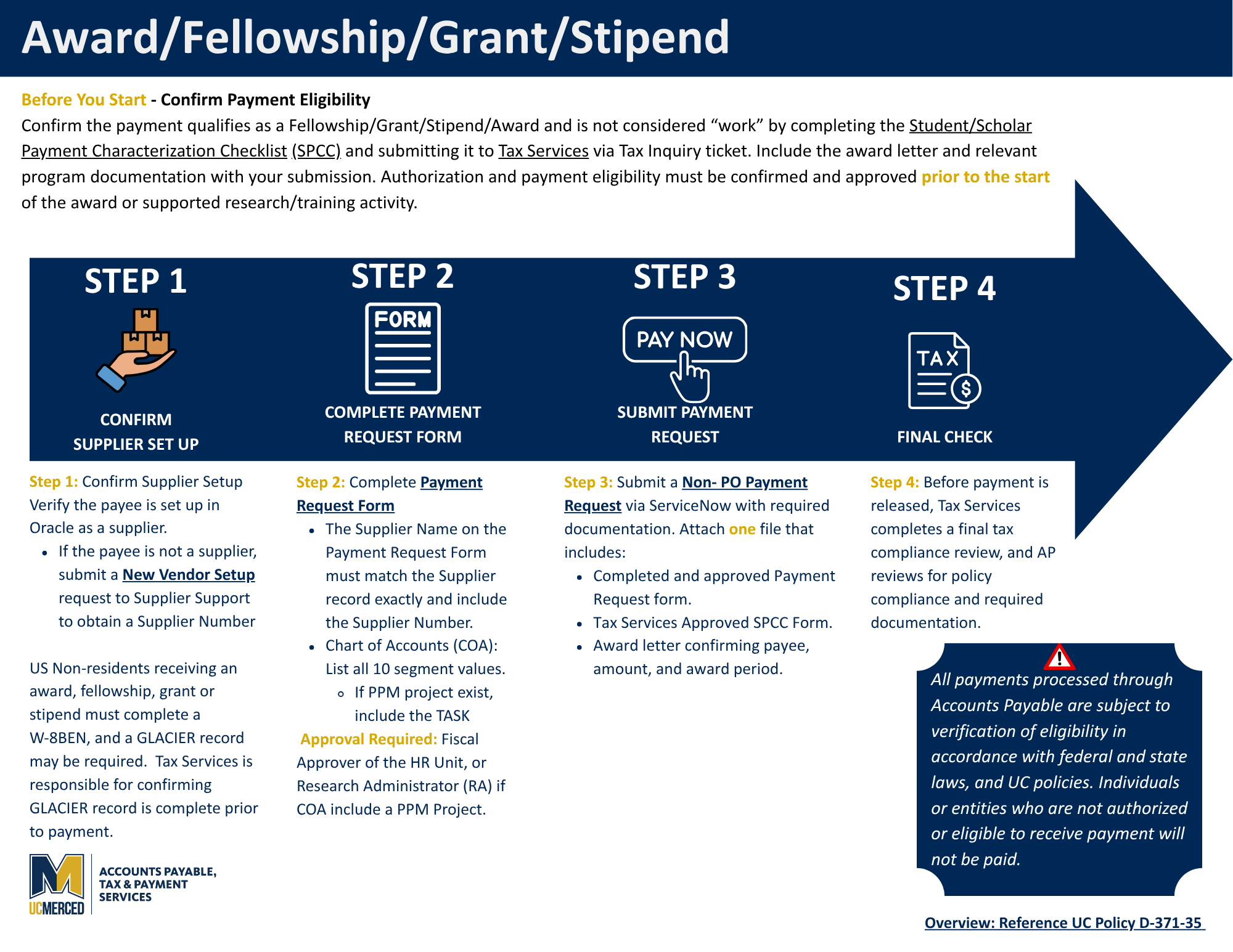
How to Request Payment for Fellowships, Grants, Scholarships and Stipends
Before You Begin
☐ Payment Eligibility - Confirm the payment qualifies as a non-service fellowship, grant, scholarship, stipend by completing the Student/Scholar Payment Characterization Checklist (SPCC) and submit to Tax Services via Tax Inquiry ticket. Include the award letter and relevant program documentation with your submission.
Authorization and payment eligibility must be confirmed and approved prior to the start of the award or supported research/training activity.
- Non-service awards, fellowships, and grants → Eligible for processing through Accounts Payable
- Services or compensation-related payments → Must route through Payroll, Academic Personnel, or HR (Independent Contractor Review).
- UC Merced student payments → Generally route through the Office of Financial Aid & Scholarships
Important Disclaimer: All payments processed through Accounts Payable are subject to verification of eligibility in accordance with federal and state laws, and UC policies. Individuals or entities who are not authorized or eligible to receive payment will not be paid.
Step 1: Confirm Supplier Setup
☐ Verify the payee is set up in Oracle as a supplier.
☐ If the payee is not a supplier, submit a Vendor Setup ticket to Supplier Support to obtain a Supplier Number.
Note: If the payee is a US nonresident, a W-8BEN must be completed, and a GLACIER record may be required. Tax Services is responsible for ensuring the GLACIER record is complete prior to payment. Please allow 3-4 weeks for processing.
Step 2: Complete the Payment Request Form
☐ Complete the UC Merced Payment Request Form.
☐ Ensure the name on the Payment Request Form matches the Supplier Profile and includes the Supplier Number.
☐ Chart of Accounts (COA): List all 10 segment values. If a PPM project exists, include the Task.
☐ Approvals:
- Fiscal Approver (for HR Unit), or
- Research Administrator (RA) if PPM project.
Step 3: Submit Your Payment Request and Required Documentation
☐ Submit a Non-PO Payment Request via ServiceNow.
☐ Attach one file that includes:
- Completed and approved Payment Request form.
- Approved SPCC Checklist
- Award letter (confirms payee, amount, and award period) and relevant program documentation.
☐ Payments are subject to a final review by Tax Services prior to payment release.